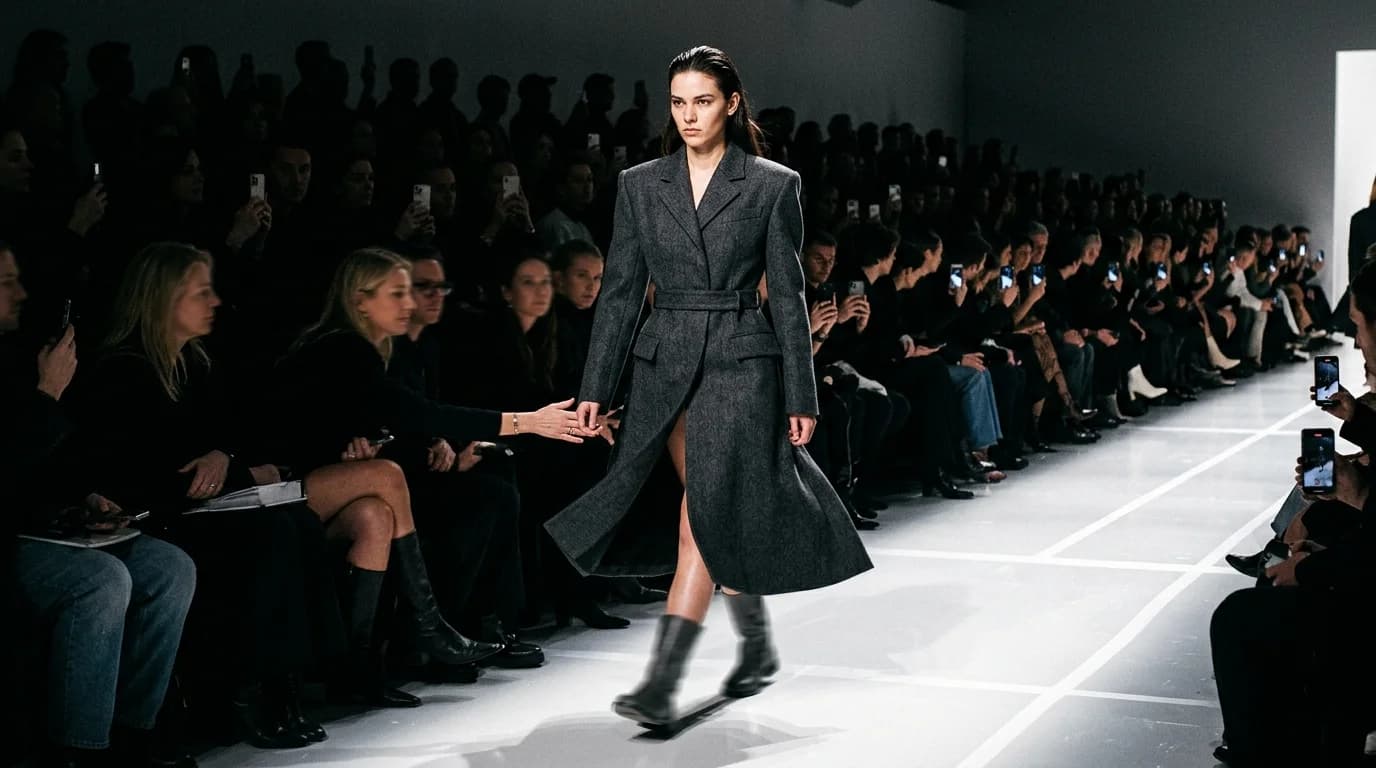
The runway walk is the most iconic format in fashion video. A model appears at the end of a long space, walks toward camera, pauses, turns, walks back. Thirty seconds that define a garment in motion under hard lighting while a front row watches.
AI can generate pieces of this. Not all of it. The approach works. The atmosphere works. The turn breaks every time. The difference between usable AI runway content and a frustrating waste of credits comes down to one question: which segments do you generate, and which do you fake in post?
This guide covers how to produce runway-style video with current AI models, building on what we know about camera movement, model direction, and fabric behavior.
What works: the approach shot
A single model walks slowly toward a static camera. Straight line. No turns. Even pace. This is where AI runway video actually delivers.
The movement is simple and linear, so the model grows in frame without confusing the generator. The garment's silhouette sharpens. Fabric responds to the walk. If the pace stays deliberate and measured rather than brisk, the output holds up.
Keep approach shots to 4-6 seconds. Longer clips risk proportion drift as the model nears the lens.
Prompt: "Model wearing [garment], walking slowly toward static camera on clean runway, even pace, dramatic spot lighting from above, dark runway background, 5 seconds"
What works: atmosphere and B-roll
The runway environment without a model. Empty runway with hard overhead lighting. Spotlights on a reflective floor. The long perspective shot down an empty space. Front row chairs. Backstage rack shots.
These clips work because nothing moves. Static scenes with a single lit runway against darkness give the AI an unambiguous target. No human motion to track, no proportions to maintain.
Use them as transitions and openers. An empty runway shot before the model appears. A lighting sweep between looks. Backstage atmosphere between garments.
Prompt: "Empty fashion runway with dramatic overhead spot lighting, reflective dark floor, long perspective shot, no people, 4 seconds"
What works: detail holds
The model stops and holds a position while the camera catches a detail. This pairs a static model pose with a push-in camera movement.
Picture a runway stance: weight on one leg, slight hip shift, arms at sides. The camera slowly pushes in from a medium shot to a close-up of the garment's key detail. That could be a neckline, a fabric texture, or a construction detail.
A still subject plus a linear camera move. Both sit squarely in what AI does well.
Prompt: "Model standing on runway in [garment], static pose, slow camera push in from medium shot to detail of [specific feature], dramatic overhead lighting, 4 seconds"
What breaks: the turn
The runway turn requires the model to pivot 180 degrees at the end, pause, and walk back. That means a complex directional change in body position while the garment stays consistent and the proportions hold.
Here's what you get instead: the garment changes shape at the pivot. Fabric teleports. Proportions shift. The face morphs. It falls apart.
The workaround: Generate the approach and the return as two separate clips. Cut between them with a flash of light, a hard cut to black, or a detail shot. The viewer's brain fills in the turn.
Sequence:
- Approach shot (model walks toward camera, 4-5s)
- Detail hold (close-up of garment, 3s)
- Return shot (model walks away from camera, 4-5s)
The detail shot bridges the direction change. Nobody notices the turn is missing because the edit follows a natural rhythm: wide, close, wide.
What breaks: audience reaction
A real runway has a front row. People watch, react, photograph. AI can generate a seated crowd, but the spatial relationship between model and audience collapses once the model walks past. Heads don't track the model. Scale shifts. Bodies clip through chairs.
The workaround: Generate audience shots as separate cutaway B-roll. A quick 2-second clip of hands clapping or cameras going off, dropped into the sequence. It implies a live audience without forcing the AI to manage model-audience interaction in one frame.
What breaks: multiple models
Real shows often have several models on the floor at once. AI cannot handle two figures in the same frame without garments bleeding between them, proportions fighting each other, and identity confusion about who wears what.
The workaround: Generate single-model clips and build the illusion of a multi-model show through rapid cuts. Model A approaches, cut to Model B at the end, cut to Model C on the return. The pacing sells the full show.
Building a runway sequence: shot list
A single garment needs 4-5 clips to read as a runway moment:
Shot 1 (3-4s): Atmosphere opener. Empty runway with overhead lighting. Sets the mood.
Shot 2 (4-5s): Approach. Model appears and walks toward camera. Slow, even pace. Full garment visible.
Shot 3 (3s): Detail hold. Camera pushes in to a construction detail, fabric texture, or neckline. Model holds position.
Shot 4 (4-5s): Return. Model walks away from camera. Back of garment visible. Generate this separately from the approach.
Shot 5 (2-3s): Closing atmosphere. Return to empty runway or audience reaction cutaway.
Total: 16-20 seconds per garment. For a 5-look show, that gives you 80-100 seconds with transitions. Budget 3-5 generation attempts per clip.
Lighting for runway
Runway lighting is inherently high-contrast. Overhead spots. Dark surrounding space. Hard shadows. AI reproduces this well because the visual pattern is distinct and common in its training data.
Prompt elements: "dramatic overhead spot lighting," "dark runway background," "reflective floor," "high contrast." Pair with the lighting consistency techniques for multi-clip projects.
Stay away from colored gel lighting on runway sequences. Hue inconsistency between clips will break the illusion of a continuous show faster than any other artifact.
Post-production: making it feel live
Music. Runway shows run on bass-heavy, rhythmic tracks. Match your cuts to the beat. That rhythm-editing step is what turns a collection of AI clips into something that reads as a show.
Sound design. Layer in ambient sounds: crowd murmur, camera shutters, footsteps on a hard floor. These audio cues do more than you'd think. Even when the video is clearly generated, the sound sells a live event.
Pace. Real runway walks are slow and deliberate. Edit at that same pace. Don't rush the cuts. Let each garment breathe. A 5-second approach clip feels more like a runway than a 2-second clip with fewer artifacts.
FAQ
Can AI generate a full runway show?
Not in one continuous sequence, no. You generate individual segments (approach walks, detail holds, atmosphere shots, return walks) and edit them together. The turn at the end of the runway never generates cleanly. Fake it with editing.
How do I handle the runway turn in AI video?
Skip it. Split the walk into approach (toward camera) and return (away from camera) as separate clips. Bridge the gap with a detail close-up or a flash cut. The viewer fills in the turn without noticing.
What's the best lighting for AI runway video?
Hard overhead spot lighting with a dark background and reflective floor. The AI has seen plenty of this in training data and produces steady results. Avoid colored gels. Hue inconsistency between clips will break the illusion before anything else does.
How many clips do I need for one runway look?
Four to five: atmosphere opener, approach walk, detail hold, return walk, and a closing shot. That's 16-20 seconds per garment. Budget 3-5 generation attempts per clip.