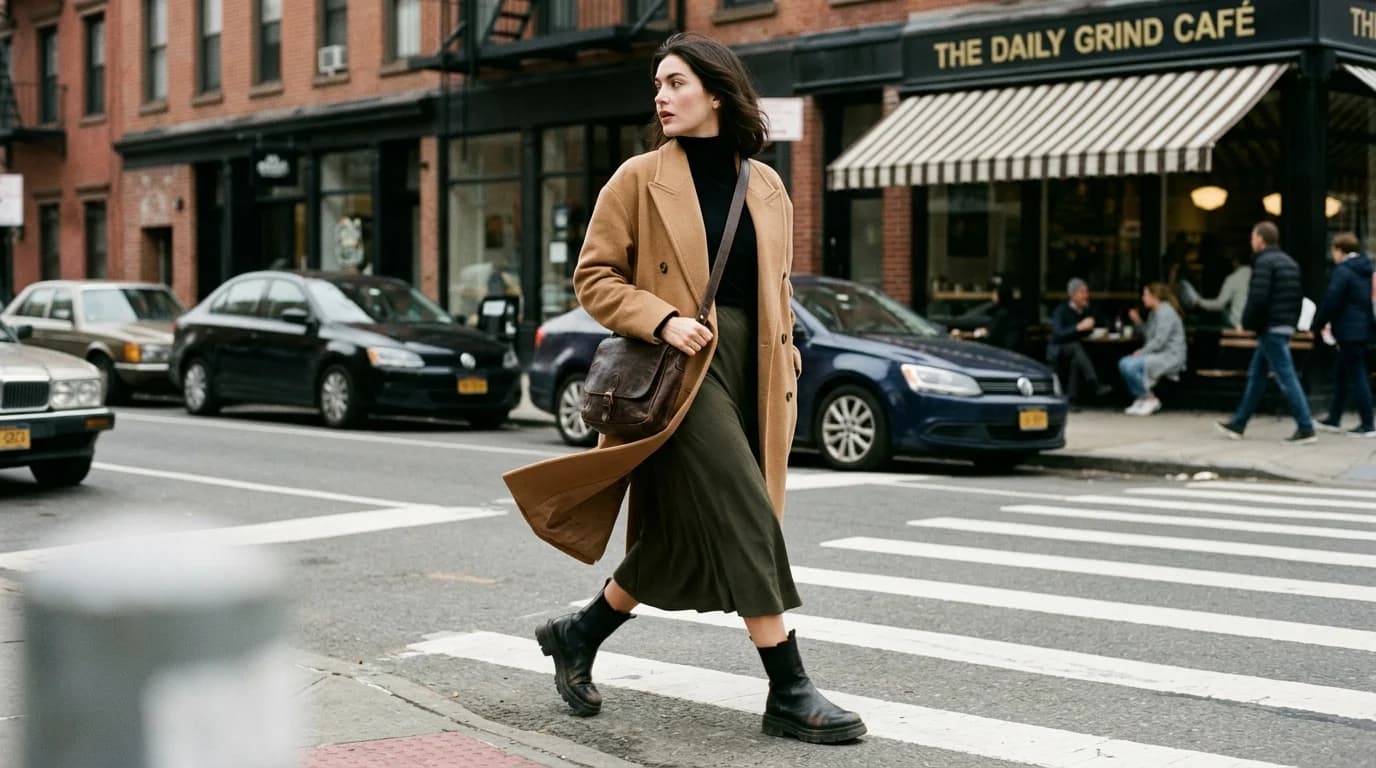
A garment on a clean background is a product shot. A garment styled with other pieces, in a context, with considered details, that's editorial. The difference is styling, and it's what separates AI fashion imagery that looks like a real shoot from imagery that looks like a software render.
Most AI fashion prompts stop at the garment. Silhouette, fabric, color, done. The result is technically correct but emotionally flat. Styling — what goes with the garment, what context it sits in, how the look is composed — brings the image alive.
This guide covers how to prompt for styled looks in AI fashion image generation.
Layering: the fastest way to add depth
A single garment on a body reads as a product shot. Two or three garments layered reads as a look. Layering tells the viewer this garment exists in a wardrobe, not in isolation.
The AI handles layering when you describe each layer clearly, innermost to outermost. "Cream silk charmeuse blouse under charcoal wool blazer with notched lapel" — the AI puts the blouse underneath and the blazer on top because the language tells it to.
What works:
- Jacket or coat over a dress or top
- Scarf or shawl draped over shoulders
- Belt defining the waist over a loose garment
- Layered necklaces over a simple neckline
What struggles:
- More than 3 layers (the AI loses track of which garment is which)
- Tucked details (a shirt tucked into trousers requires a convincing tuck)
- Unbuttoned coats showing an outfit underneath (the AI sometimes merges the layers)
When in doubt, keep it to two visible layers. A coat over a dress. A jacket over a top. Simple pairs produce the most reliable results.
Accessories: what the AI can handle
Accessories complete a look. They also introduce hands, small objects, and fine details — all AI's weakest points. Choose accessories the AI can render and skip the ones it can't.
Works well: Hats, scarves, belts, simple earrings, layered necklaces (without visible clasps), sunglasses. Either large enough that fine-detail issues don't matter, or positioned against the body in ways the training data covers well.
Works sometimes: Bags (if held at the side with a straight arm — the hand-bag interface is the problem), watches (the face sometimes renders correctly, sometimes not), rings (visible only in close-ups, and AI hands are unreliable at any scale).
Avoid: Intricate bracelets, statement rings, anything requiring detailed hand-object interaction. These produce artifacts more often than not. If the shot absolutely needs a bracelet, frame below the wrist and crop it out, or add it in post-production.
Footwear: choose by simplicity
Shoes appear in full-body shots and change the proportions. A column dress reads completely differently with pointed heels versus chunky platforms versus flat sandals.
The AI handles footwear best when the form is simple. Pointed-toe heels, ankle boots, and clean sneakers all generate reliably. Strappy sandals with multiple buckles and complex lacing are riskier — fine details sometimes blur or misrender.
Specify the shoe style in the prompt. "Pointed black heels" or "white leather sneakers" or "black ankle boots." Don't leave it to the AI's default, which tends toward generic pumps.
Context and setting
The setting changes the story. A cocoon coat in a studio looks like a product. The same coat on a quiet street in overcast light looks like editorial. On a rooftop at golden hour it looks like campaign.
Studio settings (clean background, controlled lighting) are the most reliable and the least interesting. Use them for product and lookbook work where the garment needs to be the sole focus.
Urban exteriors (streets, sidewalks, doorways, building facades) add context without overwhelming the garment. Keep the background simple: "quiet city street" or "neutral building facade." Avoid specific landmarks or busy scenes with crowds.
Interior settings (apartments, studios, staircases) add warmth and intimacy. "Soft window light in a minimalist apartment" produces a specific aesthetic. Interior settings work well when the room is simple and the light source is clear.
Natural settings (fields, beaches, gardens) work for editorial and campaign imagery. "Standing in tall grass at golden hour" is a classic fashion editorial context. Keep the natural element simple — one grass type, one time of day, one lighting condition.
The rule: one garment, one setting element, one lighting condition. Multiple setting details (a busy market with mixed lighting and pedestrians) overwhelm the AI.
The styled prompt formula
[Garment layers] + [accessories] + [footwear] + [model direction] + [setting] + [lighting] + [photography style]
Example: "Model wearing cream silk charmeuse blouse under charcoal wool blazer with notched lapel, dark tailored trousers, pointed black heels, simple gold hoop earrings, standing on quiet city sidewalk, soft overcast natural light, editorial fashion photography"
That's a complete styled look. The AI gets the garment composition, the accessories, the footwear, the context, the light, and the photographic intent. Compare that to just "wool blazer" — the styled version produces an image you could put in a magazine.
Common styling mistakes
Too many accessories. Each accessory is another detail the AI needs to render correctly. A bag, a hat, a scarf, earrings, and a belt in one image is five opportunities for artifacts. Pick 1-2 that complement the garment and skip the rest.
Mismatched register. A casual linen dress styled with formal jewelry and pointed heels sends mixed signals. The AI won't catch this — it'll render whatever you describe. The styling logic has to come from you. Match the accessories and context to the garment's formality and mood.
Generic context prompts. "In a nice setting" tells the AI nothing. "On a quiet cobblestone street in soft late-afternoon light" gives it a specific scene to render. The more specific the context, the more convincing the result.
Ignoring the color story. Accessories and settings should support the garment's color palette, not compete with it. A midnight blue dress against a bright orange wall is a deliberate contrast. A midnight blue dress against a cool gray building is harmony. Both can work, but both should be intentional.
FAQ
How many layers can AI handle in one image?
Two reliably. Three is possible but sometimes the AI merges garments or loses track of which is on top. Stick to a primary garment plus one outer layer (coat, jacket, scarf) for consistent results.
Which accessories work best in AI fashion images?
Large, simple ones: hats, scarves, belts, simple earrings, sunglasses. Avoid anything requiring detailed hand-object interaction (rings, intricate bracelets, clasped bags). Those produce artifacts.
How do I make AI fashion images look editorial instead of catalog?
Add context. A setting beyond a clean studio, natural or overcast lighting instead of flat studio light, deliberate accessory choices, and a photography style reference ("editorial fashion photography" in the prompt). The garment stops being a product and becomes a story.
Should I specify shoes in AI fashion prompts?
Yes, for any full-body shot. Footwear changes the garment's proportions and mood. "Pointed black heels" versus "white sneakers" versus "ankle boots" each produce a different interpretation of the same outfit.